FFootings
For builders and contractors

Estimate it. Win it. Bill it. Know what you made.

Manage every job. Control every dollar. Footings keeps the job and the books connected in one workflow. Price a job by cost and markup, turn the award into invoices, track every supplier bill against it — and your profit, your GST return and your balance sheet all update themselves. Your crew clocks in on their phones, and the office gets payroll-ready hours.

Try it now — no sign-up Install on your phone

Opens with sample data so you can click through everything first.

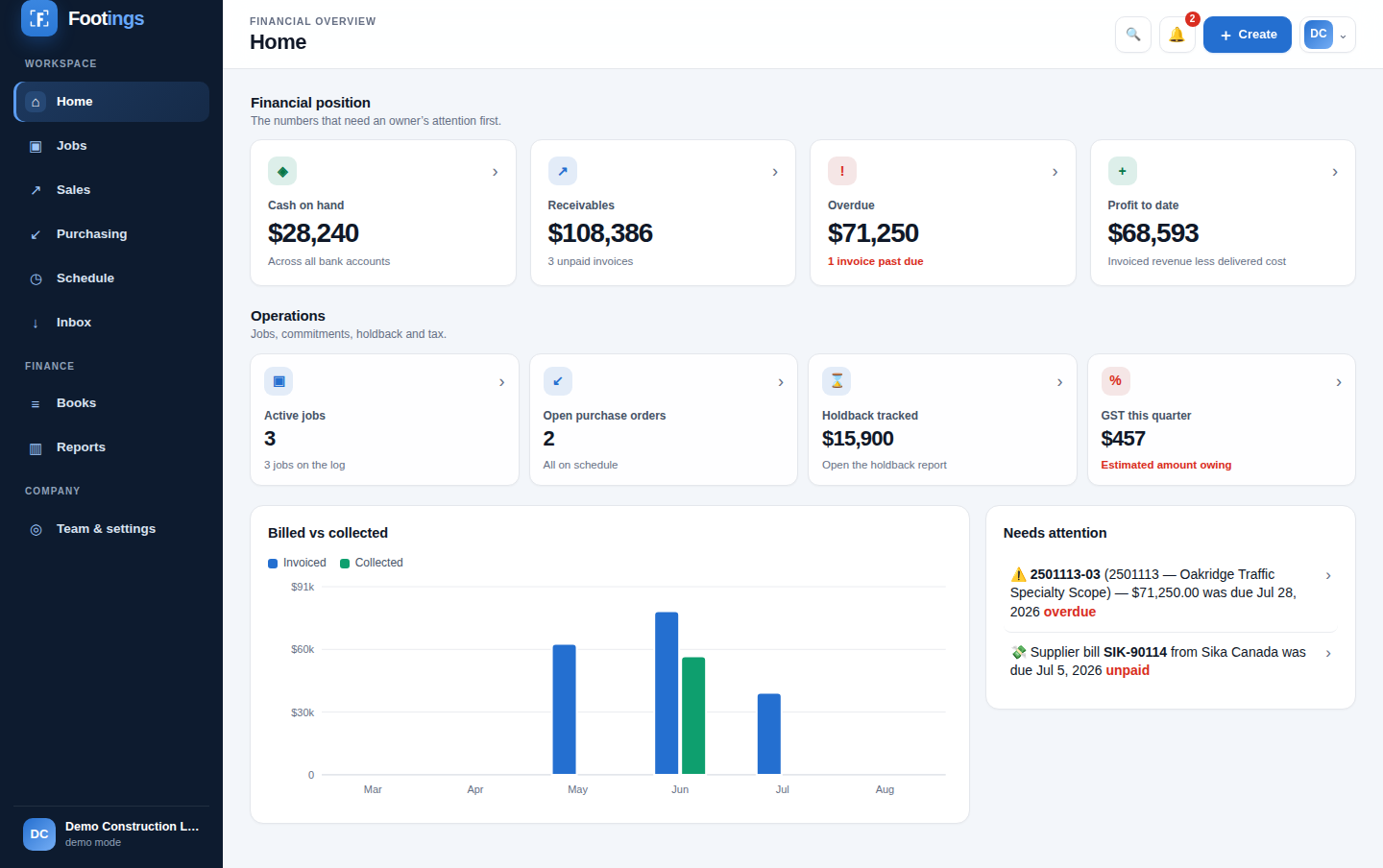
The Footings dashboard showing cash, receivables, overdue invoices, open purchase orders and profit

Built for how builders and contractors actually work

Not a general-purpose accounting package with job costing bolted on the side, and not a US remodeler app. Trades, subtrades and specialty contractors alike — any work that gets quoted, awarded, supplied, installed and billed in draws, with configurable sales-tax and holdback workflows.

Step 1Estimate priced by cost and markup, with the margin showing as you type
Step 2Marked awarded — becomes the contract, LOI or PO you bill against
Step 3Progress invoices draw it down, with GST and holdback handled
Step 4POs and supplier bills land as real cost on that job
Step 5Payments settle it, and the books post themselves
📐

Estimating with real margin

Enter unit cost and markup; the price follows. See the margin per line and per job before you send it — then compare it to what the job actually delivered.

🧾

Invoices that look right

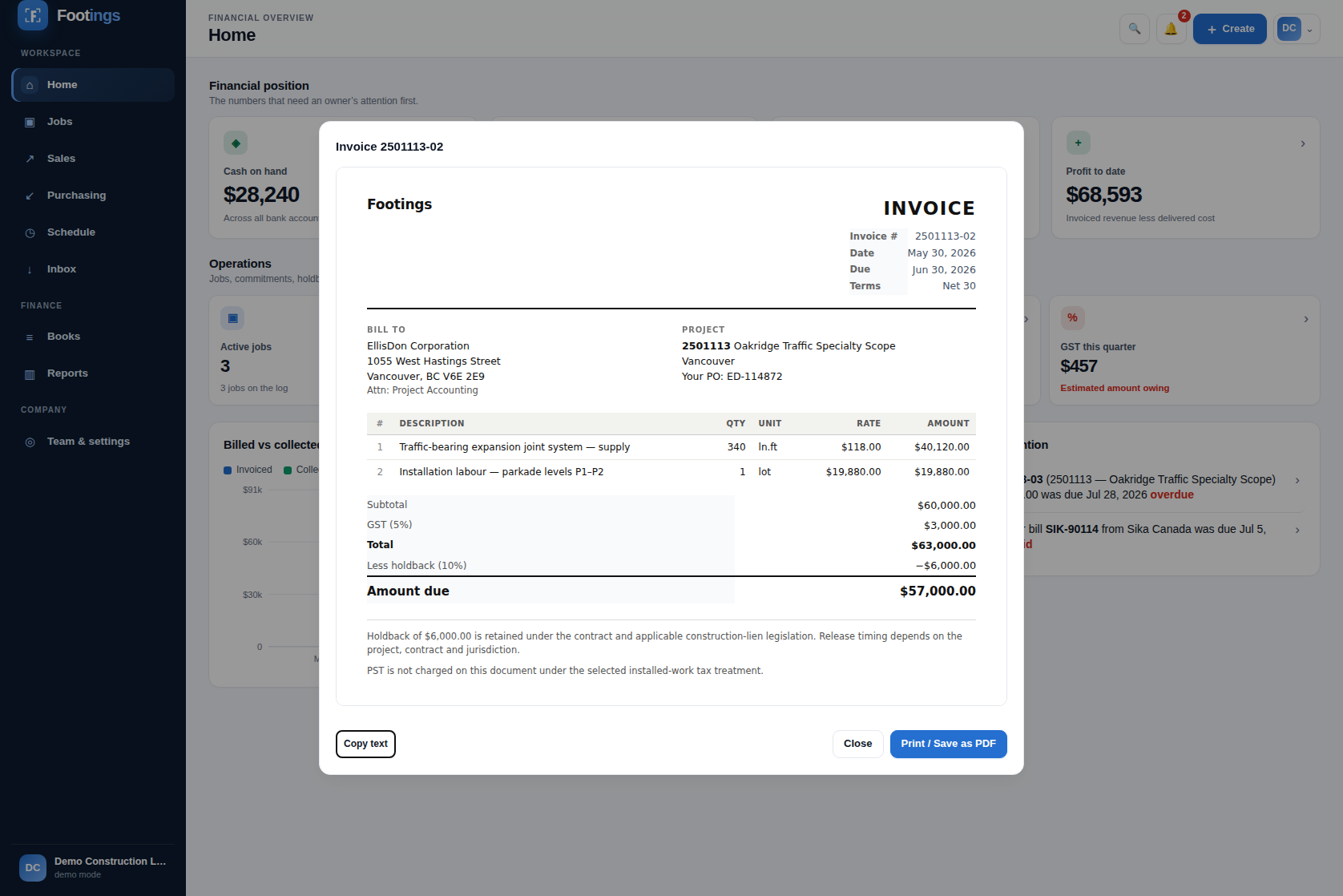
Your letterhead, their PO reference, line items, GST, holdback deducted the way a Canadian progress invoice reads, with clear holdback disclosure. Print or save as PDF.

📦

Purchase orders and supplier bills

Part numbers, ship-to, required-by dates. Turn a PO into the bill in one click, and see committed cost against what has actually been billed.

🇨🇦

Configurable Canadian tax

Configurable Canadian tax defaults, including supply-only and supply-and-install treatment. Confirm the correct province and contract treatment with your accountant.

📊

Fourteen reports

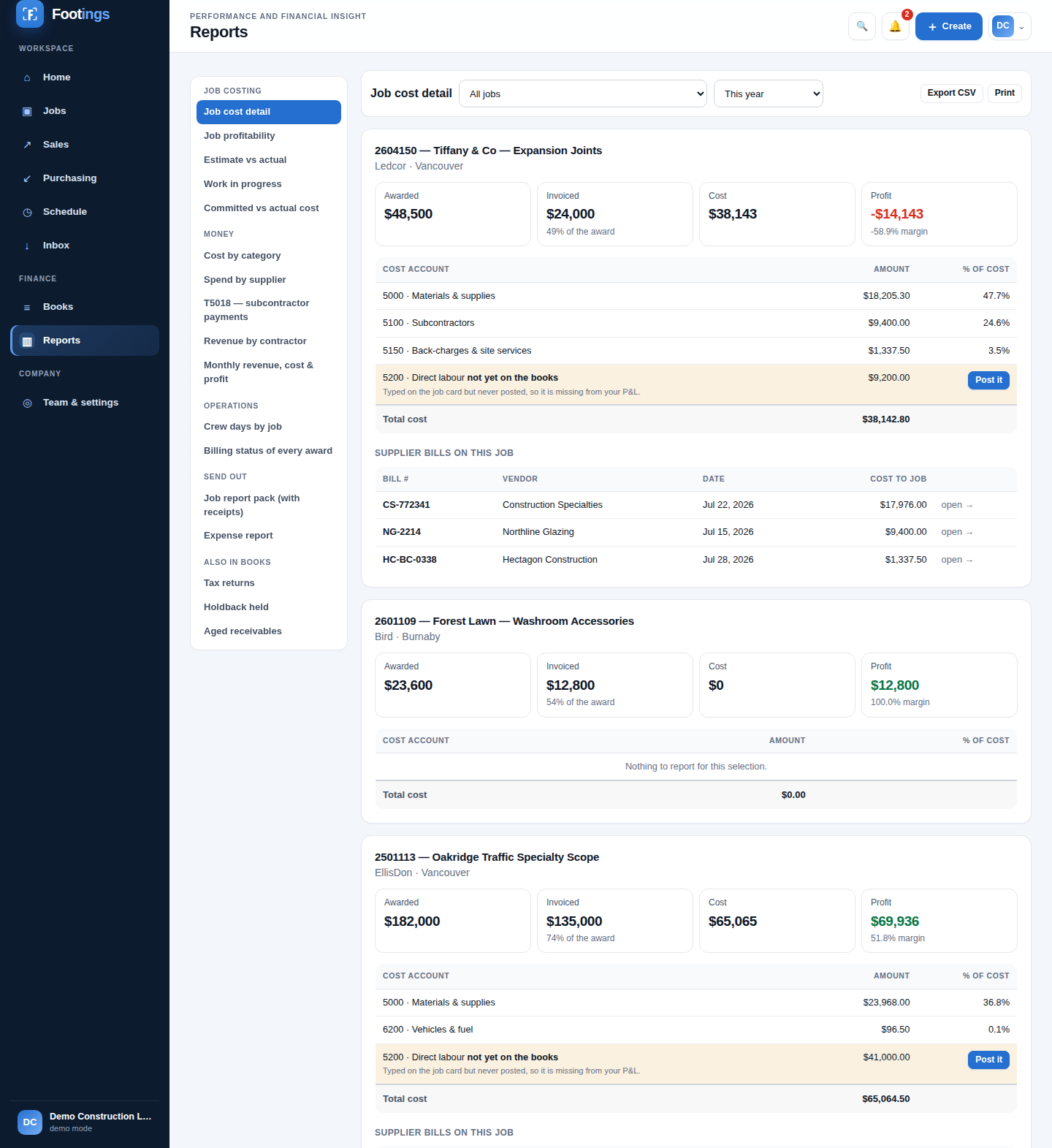
Job cost detail, profitability, estimate vs actual, work in progress, committed vs actual, spend by supplier, revenue by contractor. All drill down. All export.

📚

Books tied to the job

Real double-entry. Invoices, bills and payments post automatically, and the reports use the same ledger-derived records.

Know the profit while the job is still running

Open any job and see what was awarded, what you've billed, what's left to bill, what it has cost you and what you're making — without waiting for your bookkeeper.

  • Awarded, invoiced, collected and holdback held, per job
  • Over-billed warnings when you've billed past the award
  • Committed cost on POs that hasn't hit your books yet
  • Quoted margin against delivered margin, so the next bid is sharper
  • Open and closed projects: confirm the close-out when the work is done, and it shows Closed once nothing is owed and no holdback is left
Job profitability report showing awarded, invoiced, cost, profit and margin for each job
A printable Footings invoice with letterhead, line items, GST and holdback deducted

Paperwork the contractor takes seriously

Estimates, invoices and purchase orders print on your letterhead with your GST number, payment terms and bank details — the difference between getting paid in 30 days and chasing it for 90.

  • Estimates with scope, validity date and an acceptance signature block
  • Invoices with holdback, tax lines and payment instructions
  • POs that tell the supplier to quote your PO number on every packing slip
  • Everything prints or saves as PDF from any device

Your crew clocks in on their phones

A time clock built for the job site. The crew clocks in on the project they are on; the office sees who is in, approves and corrects hours, and gets payroll-ready hours and wages.

  • Clock in and out, breaks and switching projects — on any phone, installed from this page
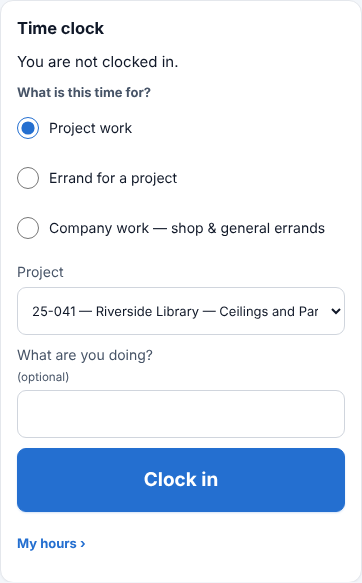
  • Say what the time is for: project work, an errand for a project, or shop and company work
  • Location at clock-in if you turn it on; set to required, a site check refuses a clock-in clearly off site
  • Photos, receipts and notes from the job go to the project or the office Inbox
  • Roles: field crew see the clock and their own hours — no prices or money; managers see their projects
  • Hours count when someone clocks out, or turn on weekly approval; every correction stays in the history
The Footings time clock on a phone: what the time is for (project work, an errand for a project, or company work), the project, and Clock in
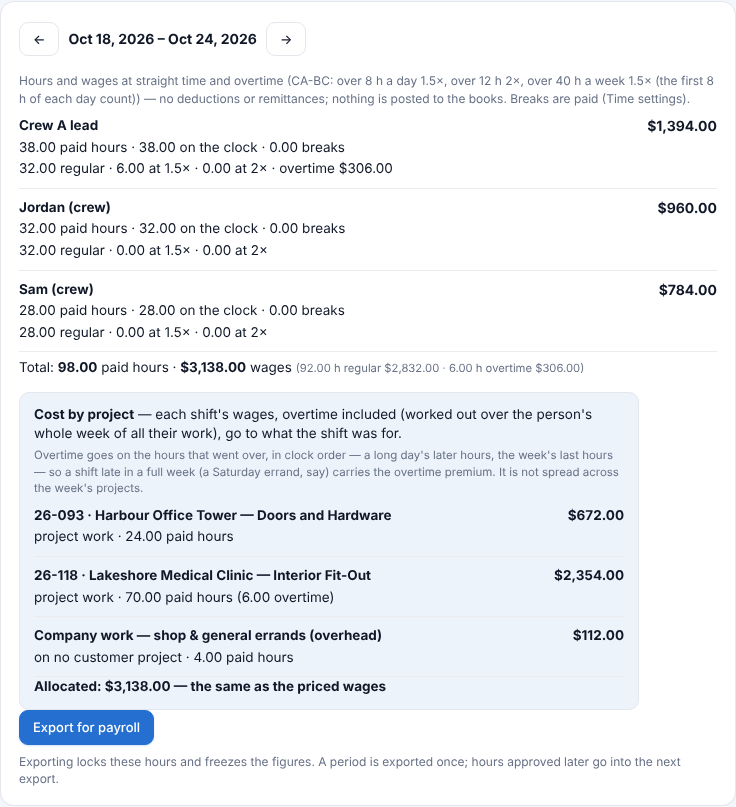
A Footings payroll sheet for one pay period: each person's paid hours, regular and overtime, wages, and the cost by project

Payroll-ready hours, with overtime worked out

Each pay period's paid hours and wages, by person and by project, worked out from the clock — then exported once as a file for your payroll.

  • Overtime by day and week for BC, Alberta and Saskatchewan; other provinces at straight time for now
  • Cost by project: each shift's wages, overtime included, on the project it was for — and shop work apart
  • Export for payroll locks the period, and a file you sent stays as it was. Approved hours an export missed go into the next export; changes to a week already exported can also produce wage adjustments. Correcting a priced line's project or work type moves its cost in the next export, without changing pay
  • Hours without a pay rate are unpriced — their wages are unknown, not $0 — and if they were exported without a rate, correcting their project later moves nothing
  • Not payroll itself: no deductions, pay stubs or remittances, and wages do not post to the books yet

Pricing

The invoicing, receipt-reading and job-costing a contractor actually uses — work most crews spread across three apps at $240 a month — in one place, from $59.

Founding Customer Pricing

Today's prices are founding prices for the first 100 paying companies. Your price is protected for 24 months from your first payment while your subscription continues — changing plan, or switching between monthly and annual, keeps it — and after that it changes only after at least 30 days' notice. Once the founding places are taken, new customers pay the standard price shown under each plan. Prices are in Canadian dollars, plus applicable taxes. Founding pricing terms

Every new company starts with 14 days of Business free — the whole product, no card. When the fourteen days are up you move to Free and keep everything you built: it stays visible, readable and exportable. What stops is creating past the Free limits. Quote as much as you like and send five invoices a month on Free, for as long as you like. Want to see the whole thing first? Open it with sample data — no sign-up — and run a job through it end to end: quote, purchase order, supplier bill, invoice. Nothing you make is ever deleted, hidden or locked.

Free

C$0 forever
  • Unlimited estimates
  • 5 invoices a month
  • Send, get paid, export — always
  • 1 person
Start free

Pro

C$59 / month

or C$566/year — 2 months free

Standard after the founding places: C$74/month or C$708/year

  • Unlimited invoicing
  • What each job cost you — purchase orders, supplier bills, expenses
  • Profit per job, holdback, provincial tax
  • Footings reads 150 documents a month
  • 3 people
Start on Pro
Most popular

Business

C$149 / month

or C$1,430/year — 2 months free

Standard after the founding places: C$186/month or C$1,788/year

  • Everything in Pro
  • The full accountant-grade books — ledger, journal, trial balance, balance sheet
  • Ask the assistant about your own books — "what's open on this job?" answered from your records. Read-only, sees only what you can see
  • Close a period, tax-return worksheets
  • Footings reads 600 documents a month
  • 10 people
Start on Business

Enterprise

from C$349 / month

or from C$3,350/year — 2 months free

Standard after the founding places: from C$436/month or C$4,188/year

  • Everything in Business
  • Document reading sized to your operation
  • Up to 25 people — for teams past 10 or heavy volume
  • Priority help, migration done for you
Start on Enterprise
Where the line actually is. Free is a good invoicing app: quote as much as you like, bill five a month, send it, get paid, export everything. What Free cannot tell you is whether the job made money — that needs the purchase side, and the purchase side is Pro. If you have never once wondered where a job's margin went, Free is genuinely enough and we would rather you stayed on it.
What "documents read" means: snap or upload a receipt, invoice or supplier bill and Footings reads it automatically (AI-assisted) and fills in the entry — vendor, amounts, tax, job — for you to confirm. That's what the monthly allowance counts. Typing entries in by hand is unlimited on every plan, and capturing and storing a document is never metered — only having it read for you.

The limits are real, and here is exactly where the hard line sits: invoices past the Free allowance and the purchase side both stop at creating something new. Nothing you already made is ever touched. On any plan, on the free one, and after dropping down from a paid one, you can always send your invoices, take payment on them, download them, and export the lot. We will never hold your records to ransom to sell you a plan, and going back down a plan is never refused.

Bigger than 25 people? That's a custom plan, priced to your operation — say hello and we'll set it up.

No surprise bills, ever. Hitting a limit stops an action and asks you — it never quietly bills you for going over. Nothing is charged unless you pick a paid plan and enter a card yourself; cancel from inside the app any time and you keep the month you paid for. Companies already using Footings stay on early access until we email them, at least 30 days before anything changes.

The straight answer on QuickBooks: many contractors will find Footings covers what they used it for — invoicing, bills, job costs and books their accountant reviews at filing time. Footings is in active beta: there are no bank feeds yet (statement import is on the roadmap), no payroll runs (it works out hours and wages for your payroll, but no deductions, pay stubs or remittances), no direct CRA filing, and your accountant should review the tax worksheets before anything is filed.
Install it on anything

Footings installs straight from this page — no app store, no download, no waiting for approval. It opens in its own window, can reopen its cached shell without a signal, and updates itself. Cloud data and saving still require a connection.

📱 iPhone & iPad

  1. Open this page in Safari
  2. Tap Share
  3. Tap Add to Home Screen

🤖 Android

  1. Open this page in Chrome
  2. Tap the ⋮ menu
  3. Tap Install app

💻 Mac

  1. Chrome or Edge: click the install icon in the address bar
  2. Safari: File → Add to Dock

🪟 Windows

  1. Chrome or Edge: click the install icon in the address bar
  2. Or ⋯ → Apps → Install this site as an app

Everyone on your crew installs the same way and joins your company with a temporary, revocable invite code.

Questions

Do I have to stop using QuickBooks?

No. Plenty of people will run Footings for jobs, estimating and job costing and keep their accountant on QuickBooks — everything exports to Excel and CSV. If you do want to move the books across, Footings keeps a full double-entry ledger, trial balance and statements.

Does it file my GST return?

It prepares it — lines 101, 105, 108 and 109 filled in for whatever period you pick, plus a separate PST return. You or your bookkeeper file it through CRA My Business Account. Have your accountant confirm the treatment of supply versus installation before you rely on it.

Can my crew use it?

Yes. You invite each person with their email and a role, and they sign up with that email. Field crew clock in and out on their phones, add photos, receipts and notes from the job, and see their own hours — no prices or money. Project managers see their own projects, an operations manager runs every job without the books, and accounting sees the books.

What happens to my data?

Each company's records are locked to that company in the database itself, not just in the app — isolation is enforced by database Row Level Security, and those rules are covered by an automated attack-test suite that runs before every release. Your data stays in Canada, and you can export everything to Excel at any time; nothing is held hostage.

Is it finished?

It is in active beta and honest about it. Estimating, invoicing with PDF and email, purchase orders, supplier bills, payments, job costing, reading a photographed invoice straight into the books, the crew time clock with payroll-ready hours, reporting and the double-entry ledger all work today. Bank statement import, bank reconciliation and payroll runs (deductions, pay stubs, remittances) remain scheduled work.

Have a look with sample data

Nothing to sign up for and nothing to install — the demo opens with three jobs, real invoices and a working set of books.

Open the sample — no sign-up